







Hardware
Simplify Your Media Projects with a Python and FFmpeg Server Setup

In the fast-paced digital world, media professionals are often inundated with a vast array of media files, making organization and workflow efficiency critical yet challenging. This issue is not just a minor annoyance; it can significantly impede productivity and stifle creativity. To address this, the innovation of an automated media ingestion server has come into play, seamlessly integrating advanced hardware, automated scripting with Python, and thoughtful design. This undertaking highlights the remarkable capabilities of technology in streamlining workflows, leading to better organization and increased creative output.
Introducing Amos: The Automated Media Ingestion Server
Allow me to introduce “Amos,” a custom-engineered server purpose-built to automate the often-laborious tasks associated with media management. Developed by content creator Raid Owl, Amos leverages powerful tools such as FFmpeg and HandBrake CLI for encoding files, while simplifying the editing process through proxy generation. The server centralizes media storage, enhancing both accessibility and organization. Whether you’re a filmmaker, a video editor, or an enthusiastic hobbyist, Amos illustrates how automation can refine workflows to unlock unprecedented creative potential.
Core Functionality of the Media Ingestion Server
The primary role of the media ingestion server is to automate the detection, encoding, and transfer process for media files sourced from diverse storage devices. By minimizing the need for manual intervention, Amos enables a smooth and efficient workflow. Its key features include:
- Automated Encoding: Converts media files to optimized formats using the H.265 codec, which is perfect for long-lasting storage.
- Proxy Creation: Generates tailored proxies for editing to ensure consistency across projects, simplifying the editing process.
- Centralized Storage: Moves encoded files to a network-attached storage (NAS) system for organized and easy access.
This automation saves valuable time while also boosting reliability and uniformity in media handling. From SD cards to USB drives and DVDs, the server facilitates every aspect of the ingestion process, rendering it a vital tool for media specialists.
Hardware Design: A Modular and Scalable Approach
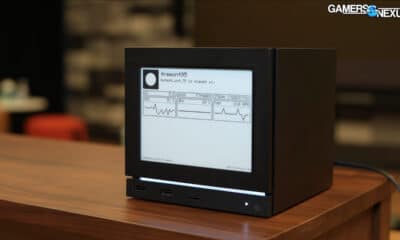
The hardware design of Amos strikes an impressive balance between performance and practicality, tailored to meet the demands of contemporary media workflows. its custom 3D-printed, 2U rack-mountable chassis is compact and modular, paving the way for future upgrades. The vital hardware elements include:
- ITX Motherboard: Provides essential connectivity within a small footprint.
- AMD Ryzen 7600X Processor: Delivers powerful multi-threaded performance suitable for demanding encoding tasks.
- Intel Arc A310 GPU: Chosen for its hardware encoding capabilities, effectively addressing compatibility challenges with Linux-based systems.
- Icy Dock Units: Allow for hot-swappable storage, facilitating rapid media transfers from various sources.
- M.2 to SATA Adapters: Expand SATA connectivity, accommodating more drives.
- Low-Profile Cooling Systems: Ensure thermal efficiency in the compact design for consistent operation.
This modular architecture not only prepares the system for future needs but also exemplifies the project’s commitment to customization and cost-effectiveness through the innovative use of 3D printing technology.
Software Automation: Streamlining Media Workflows
The server’s primary functionality hinges on Python scripts that vigilantly monitor linked storage devices for new media files. Upon detection, these files undergo processing through two powerful encoding tools:
- HandBrake CLI: Excels at converting DVDs and Blu-rays into digital formats to ensure compatibility and efficiency.
- FFmpeg: An adaptable tool for encoding various video formats, enhancing versatility in media handling.
Utilizing multi-threaded processing allows the server to manage multiple encoding tasks simultaneously, optimizing both hardware utilization and performance. Once the files are encoded, they are swiftly transferred to a NAS system, facilitating secure storage and centralized access. This degree of automation enables media professionals to devote more time to creative endeavors instead of getting bogged down by technical details.
Challenges and Lessons Learned
The journey of creating a custom media ingestion server was not without its challenges, particularly concerning hardware compatibility and seamless integration. Key obstacles encountered included:
- Hardware Compatibility: While the AMD Ryzen processor was fantastic for multi-threading, its limited compatibility with Linux-based encoders necessitated the addition of an Intel GPU.
- Storage Expansion: The ITX motherboard’s restricted number of SATA ports required creative solutions, including M.2 to SATA adapters.
These challenges have underscored the significance of thorough planning and adaptability throughout the design phase. Future versions of the server could improve significantly through enhanced hardware cohesion, optimized software settings, and exploring containerization for simplified deployment and maintenance.
Practical Applications and Future Opportunities
The contributions of this server to media workflows are substantial, offering significant advantages across various contexts, including:
- Editing Workflows: Automates proxy creation, alleviating complications related to mixed codecs during editing sessions.
- Media Organization: Simplifies tasks related to managing personal and professional media libraries, allowing for efficient storage and retrieval.
- Remote Collaboration: Centralizes media on a NAS system, enabling seamless editing and teamwork irrespective of location.
Future enhancements could focus on improving hardware integration, optimizing overall performance, investigating innovative cooling solutions, and expanding scalable storage options. By marrying innovative hardware design with hands-on automation, this project provides invaluable insights into effective media management.
In conclusion, whether you’re managing a personal media collection or functioning within a professional editing environment, the insights gained from this project can serve as a robust framework for optimizing your media workflows into a more efficient and organized process.