Hardware
Discover High-Performance Computing On A Budget With The N1 Pro Mini PC

The Aoostar N1 Pro Mini PC is an exciting entry in the realm of affordable computing, specifically designed for those who value portability, energy efficiency, and overall functionality. Think of it as a practical workhorse for everyday tasks, light gaming, and even retro game emulation—essentially, a more compact alternative to your standard desktop or laptop.
It’s no secret that when you opt for a mini PC, you often have to weigh some trade-offs. The N1 Pro isn’t built to handle high-end gaming or heavyweight processing tasks like video editing, but it does a surprising job with everyday activities. If you’re looking for something versatile enough to stream your favorite shows in 4K or indulge in classic gaming without breaking the bank, the N1 Pro could be the perfect fit for your needs.
Compact Design with Practical Features
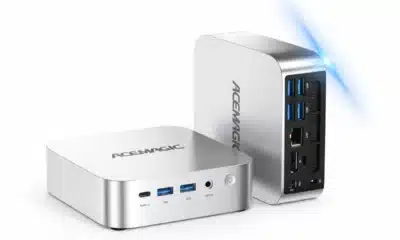
This little device has a design that prioritizes usability and simplicity, making it a breeze to integrate into any office or living space. Its small size means it won’t hog your desk or entertainment area. Need to tuck it out of sight? With the included mounting hardware, you can easily attach it behind a monitor or even on the wall, creating a sleek, clutter-free environment.
One of the standout features is its USB-C connectivity, which allows for single-cable operation. This simplification means that not only can you power the device, but you can also transmit video through just one cable—making it a great choice for anyone who appreciates a minimalist, streamlined setup.
Specifications: Performance in a Small Package
What drives the N1 Pro is an Intel N150 processor, which might sound humble, but is surprisingly capable. With a base clock speed of 2.4 GHz and the ability to turbo boost up to 3.6 GHz, paired with an integrated Intel UHD GPU, this mini PC can handle your basic graphic tasks without a hitch. Thanks to a reasonable 12GB of DDR5 RAM running at 4800 MHz, it ensures you can juggle multiple applications without a performance hiccup, though do remember that this RAM is non-upgradable—a consideration for those who might want to ramp up memory in the future.
The storage space comes from a 2242 M.2 SSD, which you can upgrade up to a max of 2TB—perfect for those who need room for files and media without constantly worrying about running out of space.
Connectivity Options
When it comes to connectivity, the N1 Pro has you covered with a solid range of options:
- Three USB 3.2 ports situated at the front for quick access to your peripherals.
- An HDMI port, a DisplayPort, and a USB-C port on the side, supporting multiple display configurations—ideal if you like to work across several screens.
- Dual 2.5Gb Ethernet ports at the back, perfect for those who need a stable, speedy internet connection, whether you’re working from home or managing a home office.
- A 3.5mm audio jack, ensuring you have convenient audio output for whatever your needs, be it for video calls or movie nights.
This arsenal of ports makes the N1 Pro adaptable enough to connect multiple devices, including 4K monitors, to boost your productivity or enhance your entertainment experience.
Everyday Performance
When it comes to day-to-day tasks, the N1 Pro shines as it’s optimized for web browsing, email, and media consumption. You can enjoy smooth 4K streaming without any lag, making your viewing experience not only enjoyable but also visually sharp. While the N1 Pro isn’t aimed at hardcore gamers, you can still play some classic games or less demanding titles like *Left 4 Dead 2* or *Dirt 3* without trouble.
If you find joy in retro gaming, this device supports emulation for platforms like the PSP, GameCube, Wii, and some PS2 games—though keep in mind that performance can vary with higher resolution games. A nifty performance mode in the BIOS also allows users to push the limits a little by increasing the thermal design power (TDP) to 20W for slightly more demanding tasks.
Cooling and Energy Efficiency
Energy efficiency is one of the highlights of the N1 Pro. The device idles at a mere 4.5W, peaks at around 8W during video playback, and draws approximately 18W when gaming. If you’re keen on reducing your energy costs while still enjoying a functional PC, this mini unit makes a strong case for itself.
Limitations to Consider
However, every rose has its thorns, right? While the N1 Pro offers a lot of advantages, it’s essential to consider its limitations:
- The non-upgradable RAM could pose a problem if you think you might need more memory for future computing tasks.
- It only supports the smaller 2242 M.2 SSDs, which may limit your upgrade options compared to the more commonly found 2280 form factor.
- If you’re looking to dive into AAA gaming titles or tackle resource-heavy tasks like video editing, this mini PC may not meet your needs.
These constraints mean the N1 Pro may not be the perfect fit for users demanding high performance or future-proofing.
Additional Features
The N1 Pro has several additional features that enhance its versatility:
- The single-cable operation through USB-C makes setting up your workspace quick and easy, keeping things tidy.
- It’s compatible with cloud gaming services like GeForce Now and Xbox Cloud Gaming, so you can play a vast library of games without needing a high-end rig.
- Plus, its energy-efficient design means it’s not just easy on the wallet but also good for the environment.
When you look at the whole picture, the N1 Pro is a solid choice as a budget-friendly mini PC. It ticks the right boxes for portability, energy efficiency, and the essential functionalities that many of us require for our daily computing routines. Though it does have its setbacks when it comes to upgradability and performance demands, its compact design and thoughtful features serve to make it a fantastic option for a secondary PC, a home media center, or just a straightforward, portable computing solution.
In a world where we often feel pressured to go big or go home, the N1 Pro reminds us that sometimes, less really is more—especially when it delivers functionality without emptying your bank account.