








Phones
Apple M4 Pro Mac Mini Is A Game Changer For Professionals

The Apple M4 Pro Mac Mini is not just another desktop—it’s a game-changer for those who crave both power and simplicity in their workspace. After using it for three months, I’ve come to appreciate how it effortlessly balances productivity and creativity. Whether you’re crunching spreadsheets, whipping up video edits, or diving into graphic design, this compact powerhouse brings performance right to your fingertips. If you’re on the hunt for a desktop solution that doesn’t weigh you down but still packs a punch, keep reading to discover if the M4 Pro Mac Mini is the right fit for you.
Performance: The Perfect Fusion of Power and Efficiency
Let’s talk performance. The M4 Pro Mac Mini is dressed to impress with its 14-core M4 Pro chip, backed by a robust 48GB of RAM and a lightning-fast 1TB SSD. Whether I’m juggling multiple web pages, developing apps, or tackling intensive 3D modeling, this little machine powers through it all without breaking a sweat. Creative tasks? It shines when I’m editing videos or enhancing photos, managing to keep a steady pace even when the going gets tough.
Sure, if you’re a hardcore gamer, you might not find this machine at the top of your list. It’s not going to rival dedicated gaming rigs, but for light gaming at moderate settings, it holds its own. Just know that if you push it hard—like during an extended gaming session— the fans might kick up a little noise. Still, thanks to the efficient M4 Pro chip, this Mac Mini maintains solid performance, making it suitable for both laid-back users and devoted professionals.
Hardware and Design: Compact, Portable, and Practical
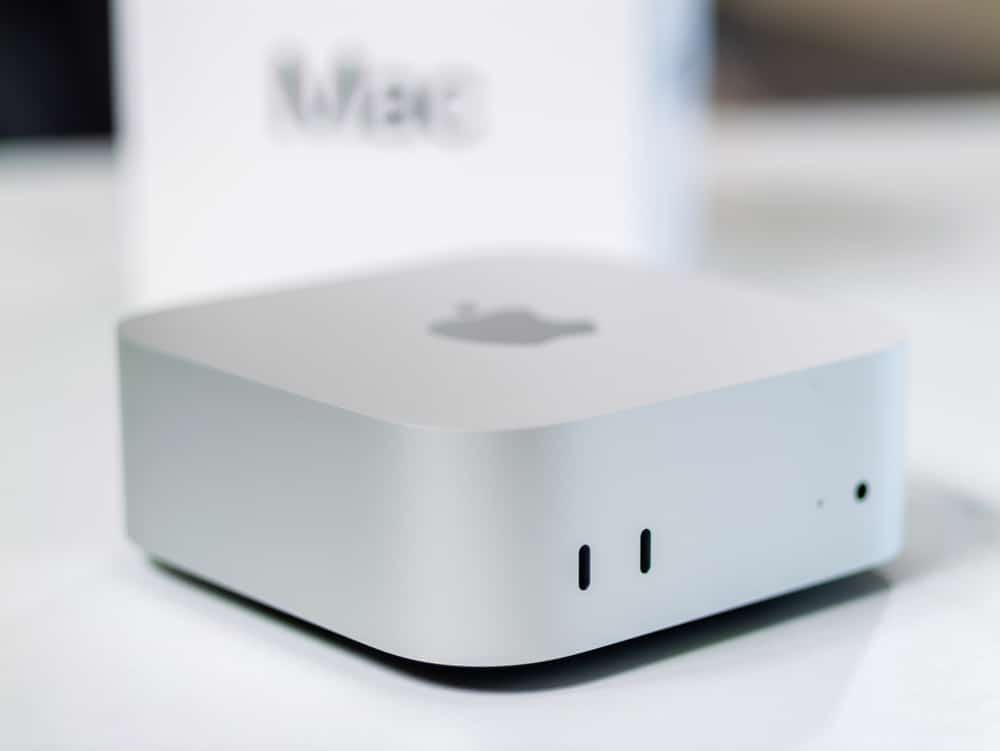
Design-wise, the Mac Mini is impressively compact. It measures about 5 inches by 5 inches and stands just 2 inches tall—perfect for slipping into tight spaces or taking with you on the go. If you’re someone who moves around a lot and needs flexibility in your workspace, this desktop is your buddy.
But let’s chat about the hardware specifics. The Mac Mini is generously equipped with:
- Three Thunderbolt 5 Ports: Perfect for anyone who wants to connect high-speed peripherals or external monitors.
- Two Front-Facing 10GB Ports: These make it a breeze to hook up USB devices without having to fiddle around at the back.
- 1GB Ethernet Port (Upgradeable to 10GB): Great for those serious about a stable connection during demanding tasks.
A little quirk? The power button is located on the bottom, which might mess with your muscle memory at first. And while the fan system usually does a great job keeping things cool, it can chime in with some high-pitched noise during heavy-duty tasks, which can get distracting if you’re in a quiet environment.
Connectivity: Seamless Integration and Reliability
One of the standout features of the Mac Mini is its connectivity. It doesn’t just stop at basic Wi-Fi. Those who crave stable connections will appreciate how well it performs with both wired and wireless options. For serious work requiring uninterrupted speed? Ethernet is your best bet.
If you’re already knee-deep in the Apple ecosystem, you’re in for a treat. Features like AirDrop make sharing files between Apple devices as easy as dragging and dropping, streamlining your workflow. And with HomeKit integration, you can control your smart home right from your desktop. It’s like having a personal hub for all your tech needs.
- Fan Noise: If you’re in a quiet space, be prepared for the cooling system to make itself known during gaming or heavy multitasking.
- Memory Bottlenecks: Even with 48GB of RAM, you might run into hiccups if you’re working on extensive projects in resource-hungry apps like Lightroom.
- Gaming Limitations: If you’re after a broader gaming library, the Mac Mini might seem a bit lacking compared to Windows.
But for most users—especially those focused on productivity or creatives working on stunning projects—these limitations are likely to be mere bumps in the road.
Value and Ideal Use Cases
When compared to pricier alternatives like the Mac Pro, the M4 Pro Mac Mini offers incredible value. Whether you’re a creative professional needing a reliable machine for 3D modeling or video editing, a software developer looking for smooth performance while coding, or someone who simply wants a capable system for everyday tasks, this Mac Mini fits the bill perfectly.
And let’s not overlook its compact nature! You can easily set it up in your cozy coffee shop corner or your minimalist home office. Plus, if you’re into customization, designing and 3D printing your own case can add a personal touch to your setup.
If you’re already intrigued, there’s so much more to explore about the Apple M4 Pro Mac Mini in our other articles and guides. From in-depth reviews to practical how-tos, there’s pretty much a treasure trove of information waiting for you.
Whether you’re a seasoned Mac user or considering making the leap, I hope this glimpse into the M4 Pro Mac Mini helps you feel a little more at home with your potential new desktop companion.









