







Hardware
Build Your Dream Gaming PC for Just $350: Unleash 1440p Power with Ryzen 7 5700G & RX 7600

PC gaming feels like a luxury these days. The prices of GPUs and CPUs are climbing, and RAM prices show no signs of dropping. Building a capable gaming rig without emptying your wallet can seem daunting. But here’s a twist: it doesn’t have to be overwhelming or unaffordable. What if I told you that assembling a smooth 1440p gaming system could be done for under $350? It sounds unrealistic, but stick with me. By scouting second-hand deals and making smart upgrades, I built a budget PC that achieves impressive performance, and I’m excited to guide you through the process.
In this article, ETA Prime provides a roadmap for transforming a basic prebuilt computer into a gaming powerhouse suitable for modern titles like Cyberpunk 2077 and Red Dead Redemption 2. I’ll detail the components, costs, and clever adjustments—including the use of FidelityFX Super Resolution (FSR)—that made this build a reality. You’ll discover how selecting a Ryzen 7 5700G CPU and a Radeon RX7600 GPU can yield remarkable performance without excessive spending. If you’re curious whether budget PC gaming can still hold its ground, this project will offer a fresh perspective.
Building a $350 Gaming PC
The Challenges of Budget PC Building
Embarking on a budget gaming PC build presents certain hurdles, particularly due to rising component prices. Hardware costs have surged over the past few years, especially for RAM and GPUs. For those on a tight budget, exploring second-hand markets or repurposing older systems becomes essential. This route may require some compromises and astute planning, but it can lead to surprisingly strong performance when executed thoughtfully.
Second-hand desktop systems make a practical starting point. These prebuilt machines often include crucial components like CPUs, RAM, and storage, which you can upgrade or enhance. However, one must keep compatibility and power supply considerations in mind to ensure the final configuration meets performance expectations.
Build Overview: Affordable Yet Capable
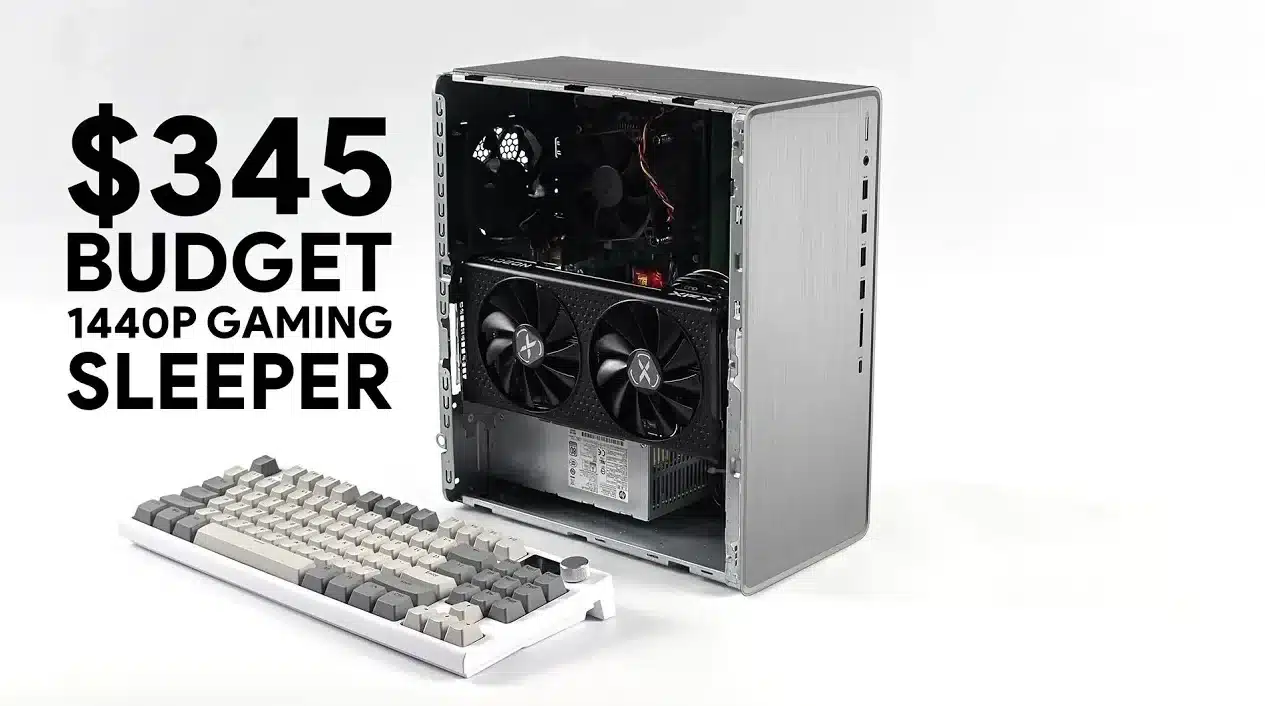
The cornerstone of this $350 build was an HP Pavilion TG01, a second-hand prebuilt system I picked up for $165. This machine boasts a Ryzen 7 5700G processor, an 8-core, 16-thread unit capable of smoothly handling modern games and multitasking. It came with 16GB of DDR4 RAM at 3200 MHz, a 256GB M.2 SSD for rapid storage, and a 400W power supply featuring an 8-pin PCIe connector.
To enhance gaming performance, I added an XFX Swift Radeon RX7600 GPU with 8GB of VRAM for $180. While it isn’t the most powerful graphics card on the market, it delivers impressive value for 1440p gaming. The total cost rounded out to $345, positioning this choice as an optimal option for gamers keen to save.
This combination effectively balances affordability and performance, ensuring a smooth gaming experience without breaking the bank. The Ryzen 7 5700G, part of AMD’s Ryzen 5000 series, stands out for its robust performance in both gaming and productivity tasks.
Budget Gaming PC Build Guide
For more insights about budget gaming PCs, feel free to explore our previous articles.
Key Components and Costs
To build a cost-effective system, it’s crucial to prioritize value and compatibility. Here’s a concise breakdown of the components utilized in this build:
- Base System: HP Pavilion TG01 (Ryzen 7 5700G, 16GB RAM, 256GB SSD) – $165
- GPU: Radeon RX7600 (XFX Swift model) – $180
- Total Cost: $345
Although the Radeon RX7600 uses a PCIe 3.0 x8 interface here, which might appear as a limitation compared to PCIe 4.0, the lower bandwidth doesn’t significantly affect gaming performance. Additionally, the provided 256GB M.2 SSD allows for speedy storage of the OS and a few games, but users with larger libraries may want to consider additional storage solutions.
Performance Optimization
To unleash the full potential of this build, I made minor overclocking adjustments to both the CPU and GPU. These changes offered a modest frame rate increase while ensuring system stability. Overclocking, performed with care, can enhance performance without requiring extra financial investment in hardware.
Moreover, leveraging FidelityFX Super Resolution (FSR) played a key role in supported games. This technology effectively upscales lower-resolution images to 1440p, boosting both visual fidelity and performance. By enabling FSR, the system achieved higher frame rates without sacrificing image quality.
Gaming Performance: Tested and Proven
This rig underwent testing with various modern titles to assess its viability for 1440p gaming. The results indicate that this budget system offers a smooth gameplay experience at high settings, making it a feasible choice for gamers seeking performance without the hefty price tag. Here are some performance numbers:
- Red Dead Redemption 2: High settings, 90 FPS with FSR
- Cyberpunk 2077: Medium-high settings, 75-85 FPS with FSR
- Forza Horizon 5: High settings, 100+ FPS
- Spider-Man 2: High settings, 110 FPS with FSR
- Borderlands 4: High settings, 141 FPS
These metrics exemplify how capable the Radeon RX7600 GPU and Ryzen 7 5700G CPU are at handling demanding games at 1440p. The implementation of FSR notably contributes to performance, allowing for smooth gameplay even in graphics-heavy titles.
Tips for Building Your Own Budget PC
If you’re considering creating a similar setup, here are a few tips to help maximize both value and performance:
- Opt for newer Ryzen CPUs, such as those from the Ryzen 4000 or 5000 series, to ensure better value compared to older models.
- Consider alternative GPUs, including the RX6600, RTX 3060, RTX 4060, or upcoming RTX 5050, which could provide comparable performance at various price points.
- Plan for additional storage, such as an external SSD or a larger internal drive, to support a growing game library.
- Explore second-hand prebuilt systems as a base for your upgrades, while ensuring compatibility with your plans.
- Utilize technologies like FSR or DLSS to boost performance in compatible games.
These strategies can help you create a gaming PC that skillfully balances cost and performance, delivering an enjoyable gaming experience without exceeding your financial limits.