




Gadgets
Unlock the Full Potential of Your Apple Watch with These 10 Essential Tips for New Users

Unlocking the full potential of your Apple Watch can feel like discovering a treasure trove of possibilities just waiting to enhance your day-to-day life. Whether you’re looking to streamline your workflow, improve your health management, or just make your device more personal, these tips will help you transform your Apple Watch into a more powerful and tailored companion.
To kick things off, make sure you have the Watch app installed and updated on your iPhone. If you’re new to this, think of the Watch app as your control center. It’s where all the magic happens—you can tweak settings, customize features, and download new apps, all without the hassle of pinching or tapping on that tiny watch face. This makes managing your Apple Watch much simpler and lets you stay focused on what really matters.
When it comes to managing your apps, don’t underestimate the handy digital crown on your watch! It’s like your personal remote control for navigating your apps. You can switch between grid and list views with ease, helping you locate what you need quickly—perfect for when you’re on the go. Plus, the Apple Watch App Store is packed with a variety of apps designed just for you, whether you’re into fitness tracking or just need a good way to manage your time.
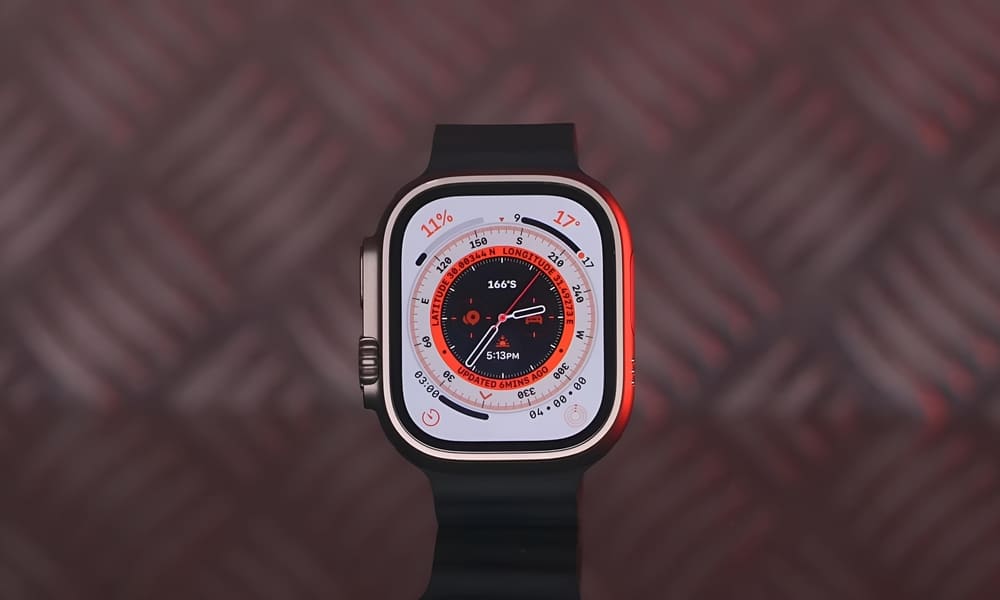
But let’s talk about something that truly reflects your personality: watch face customization. You can mix and match watch faces to create something that truly represents your style. It can be as simple as changing the color or as detailed as adding complications—those handy shortcuts that give you quick access to apps or information. Whether you fancy a modern digital look or a classic analog face, personalizing your watch is a fun way to make it yours while keeping the things you care about most front and center.
Don’t forget to utilize Smart Stack and widgets! This feature is a game-changer for anyone who loves convenience. With Smart Stack, your watch learns your habits and picks out the right widgets for you throughout the day. Want to check the weather in the morning? Or access your calendar before a meeting? Having your most-used information organized right on your wrist can save you precious time.
Now, let’s talk about audio. Whether it’s jamming out to your favorite music or catching the latest podcast, managing sound on the Apple Watch is a breeze, thanks to the Control Center. Remember those quiet moments when you don’t want to disturb anyone around you? Just flip on silent mode—easy peasy! The watch’s speakers bring the sound to you, meaning you don’t need any extra devices to enjoy your favorite tunes or catch up on the latest episodes while you’re out and about.
Adjusting the watch orientation and display settings can really elevate your experience. If you’re left-handed or prefer to wear your watch on a specific wrist, you can easily switch it up in the settings. Plus, customizing the always-on display and brightness not only helps you see the watch face in bright sunlight but can also help extend battery life—because who wants to be tethered to a charger all day?
Over time, you might realize that certain apps just aren’t cutting it for you anymore. No worries! Managing apps on the Apple Watch is straightforward. You can uninstall and reinstall apps as needed, keeping your device running smoothly and ensuring that you’re not weighed down by unnecessary bloat. This organization lets you prioritize the apps that matter, enhancing your experience without any clutter.
Managing notifications is crucial for staying connected without feeling overwhelmed. Customize which alerts you want to receive for various apps, so you can ensure that only the important updates get through. And don’t forget about Siri! This voice-controlled assistant can save you a ton of time. Need to check the weather or send a quick message? Just ask instead of tapping away, and let Siri do the heavy lifting.
Speaking of health, your Apple Watch isn’t just about keeping you connected—it can also be a critical health tool. With Emergency SOS and fall detection features, your device can help you out in those unexpected moments. Additionally, the Health app can monitor a range of metrics from your sleep patterns to exercise, allowing you to take proactive steps in managing your well-being.
And don’t overlook the power of gestures! Quick gestures, like double-tapping to answer calls, make interacting with your watch smooth and effortless. You can customize gestures for different actions, refining how you use your watch day-to-day. This added convenience makes your Apple Watch not just a tech device, but a true extension of your lifestyle.
By mastering these features, your Apple Watch can transition from a simple gadget to an indispensable part of your life that enhances your productivity, supports your health goals, and keeps you organized. As you dive deeper into its many capabilities, you’ll discover new ways to integrate your watch into your daily routine, making it not just a tool, but a motivational partner. With some thoughtful customization and exploration, you’ll find that your Apple Watch is more than just a tech accessory—it’s a companion that encourages you to stay connected, healthy, and inspired in your everyday life.