Gadgets
Transform Your iPad Pro Into A MacBook Experience For Seamless Productivity

The iPad Pro has come a long way from being just a sleek tablet to a fully-functional powerhouse, especially when paired with iPadOS and the right accessories. It has transformed into a device that meets diverse needs—be it productivity, creativity, or entertainment. Imagine being able to tweak your iPad just right, so it feels as streamlined and sophisticated as your Mac. With a few thoughtful changes, you can optimize your iPad Pro for multitasking and workflow efficiency, making it a worthy competitor to traditional laptops, like the MacBook Air.
So, why might you consider an iPad over a MacBook? It boils down to its unique combination of portability and capability. The iPad Pro is lightweight and versatile—perfect for anyone who needs a device that molds seamlessly into both work and play settings. Plus, with features like the Apple Pencil, note-taking or sketching becomes an experience brimming with precision. When you glance at that high-resolution display, whether you’re diving into documents or catching up on your favorite show, the vivid imagery is enough to captivate anyone.
While macOS does deliver the classic desktop experience that many are accustomed to, iPadOS carves out its own niche with distinct advantages. Your iPad Pro can easily switch from functioning as a tablet to a laptop, and even double as a gaming device, catering to various lifestyles. Whether you’re a busy professional balancing tight deadlines, a student handling back-to-back assignments, or an artist exploring the realm of digital illustrations, the iPad Pro adapts to your needs in ways that a traditional laptop sometimes can’t.
Now, let’s talk about how you can customize your iPad for that Mac-like feel. Making adjustments to the interface and settings can help recreate a familiar workspace. Start by setting up a “Today View” filled with your favorite widgets and shortcuts; this will give you a centralized spot that mirrors a desktop environment. Want a clutter-free home screen? Consider disabling the app library and recent apps for a simpler layout that keeps you focused. If multitasking is a priority for you, the Stage Manager feature allows you to open and arrange multiple app windows freely—think of it as a mini macOS experience.
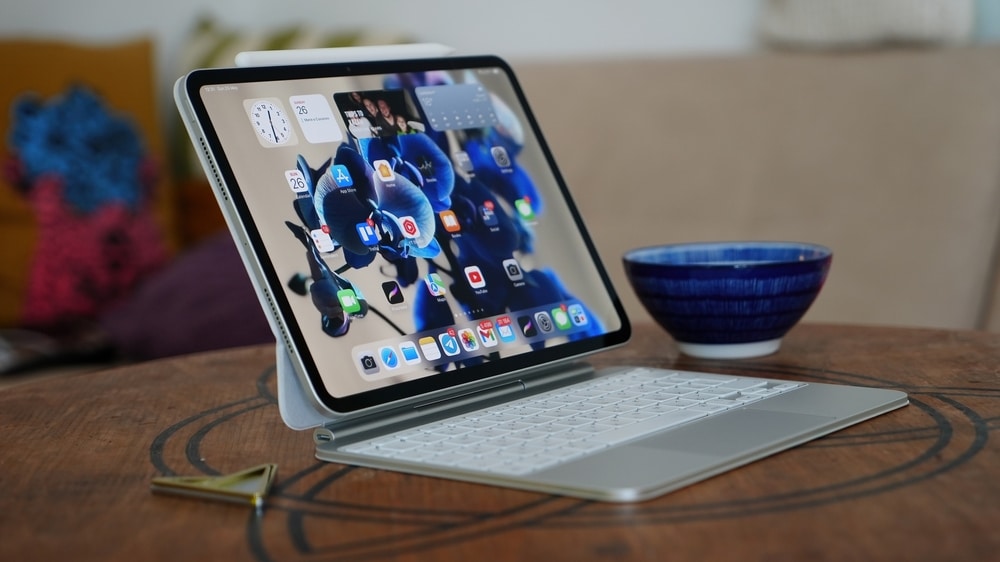
But let’s be honest: hardware accessories can really elevate your iPad Pro experience. Imagine your iPad feeling like a laptop, thanks to tools designed for efficiency and comfort. The Magic Keyboard is a game-changer with its built-in trackpad that mimics macOS gestures, offering a typing experience that’s satisfying and seamless. External mice and trackpads can enhance navigation precision, perfect for tasks like editing documents or designing graphics. Want a larger workspace? Hook your iPad up to an external display to really maximize your productivity. And don’t forget the Apple Pencil—if you’re into annotating documents or sketching, it’s like having a digital canvas right at your fingertips.
Mastering multitasking on your iPad Pro can unlock its full potential and make your workday fly by. Features like Stage Manager and Split View allow you to juggle multiple apps at once. For instance, you could draft an email while referencing another document or dive into research, all while keeping notes handy. Quick access is a breeze with Spotlight Search—just hit Command + Spacebar to jump to your apps, files, and information. And becoming familiar with keyboard shortcuts can help you navigate and execute tasks in record time.
Yet, it’s essential to acknowledge both the strengths and limitations of iPadOS. While many applications are tailored for the iPad to provide a smooth and user-friendly experience, multitasking might feel a tad less intuitive than what you’re used to on macOS. File management isn’t as robust either, so if you’re diving into advanced audio or video editing, you may hit a few bumps along the way. But the evolution of iPadOS means that improvements are constantly on the horizon, addressing various pain points users may encounter.
The iPad Pro is remarkably adaptable. It can serve as a tablet—ideal for casual browsing, reading, or streaming your favorite shows. With the right accessories, it becomes a laptop that handles your productivity tasks with ease, from document edits to email management and presentations. For the creative professionals out there, it’s a robust tool that gives you the precision and flexibility you crave. Its portability makes it perfect for on-the-go use, whether you’re in a cafe or traveling across the country.
Ultimately, the iPad Pro stands out as an excellent choice for those looking for a multifunctional device. Sure, it might not completely replace a MacBook for everyone, but it’s versatility, coupled with extensive customization possibilities, means it can meet a variety of needs. By honing your iPadOS settings, mastering multitasking tools, and investing in hardware upgrades, you can transform your iPad Pro into a powerful device tailored to you.
Image Source: Mr.Mikla / Shutterstock