








Phones
Master Your iPad with These Essential Tips and Tricks for iPadOS 26

The launch of iPadOS 26 signifies an impressive evolution in the capabilities of the iPad, catering to users ranging from casual browsers to professional creatives. This update is designed to enhance productivity and streamline workflows, transforming the device into a versatile tool that adapts to various needs. With improved multitasking, refined file management, and upgraded Apple Pencil features, the iPad continues to establish itself as a robust platform for both personal and professional use.
iPadOS 26: Transforming Multitasking and Workflow Management
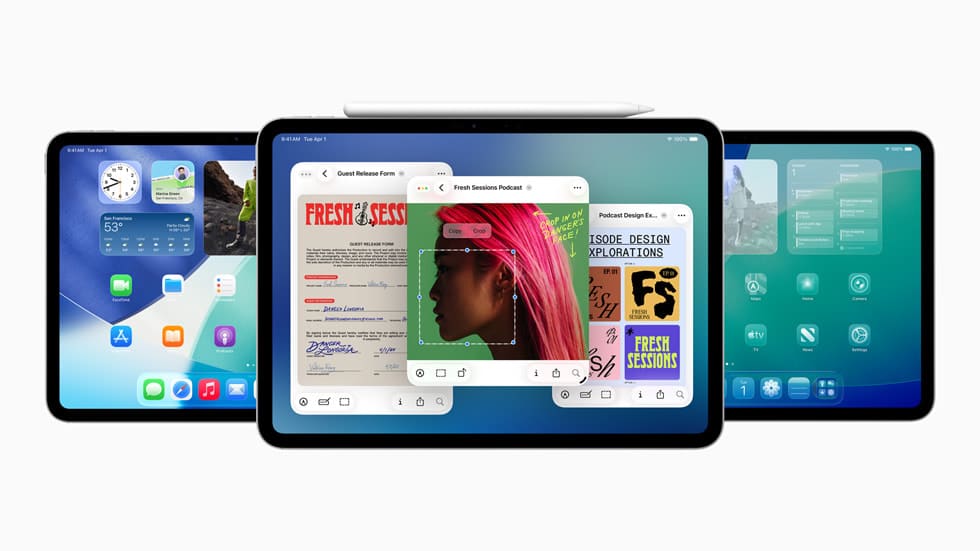
The introduction of a more sophisticated multitasking framework in iPadOS 26 enables users to experience a desktop-like environment. The new windowing system allows for overlapping, resizing, and arranging app windows seamlessly, giving users an unprecedented level of control over their workspace. Particularly advantageous for iPads equipped with the M1 chip or later, the upgraded Stage Manager now facilitates smooth integration with external monitors. This dual-display capability expands the workspace further, enhancing productivity whether for intricate projects or simple multitasking.
File management has equally seen a major overhaul. The newly added Preview app empowers users to edit, annotate, and scan documents directly on their iPads, negating the need for third-party applications. This streamlining can significantly enhance efficiency for professionals dealing with large quantities of documents. Additionally, the option to add folders to the dock for quick access reflects the convenience often found in macOS, solidifying the iPad as a capable device for managing personal and professional tasks alike.
Personalized Control Center for Efficient Access
The overhauled Control Center in iPadOS 26 puts a premium on personalization, enabling users to customize the interface based on their unique requirements. You can resize icons, incorporate app-specific controls, and reorganize settings to fit your workflow. This degree of customization ensures that vital tools and functions remain accessible, ultimately saving time and boosting productivity.
A newly designed control gallery simplifies feature management, allowing users to enable or disable settings swiftly. Enhanced security measures heighten the Control Center’s functionality by enabling users to lock sensitive applications with Face ID and conceal notifications from unauthorized access. Such improvements not only enhance overall usability but also ensure users can feel secure, making the iPad a dependable device for both work and leisure activities.
Apple Pencil: Elevating Creative Expression
The Apple Pencil continues to shine as an essential accessory for the iPad, with iPadOS 26 introducing new features that significantly broaden its utility. These enhancements cater to a variety of users—artists, designers, and students alike:
- Quick Notes: Double-tap the lock screen to instantly access the Notes app, enabling immediate capture of ideas or important information.
- Scribble Functionality: Write anywhere on the iPad to input text, delete with a scratch-out gesture, and perform actions like cut, paste, and insert text smoothly.
- Shape Recognition: Draw shapes and hold the pencil to align them perfectly, great for diagrams or detailed illustrations.
- Barrel Roll and Squeeze Gestures: Exclusive to the Apple Pencil Pro, these gestures allow for effortless tool adjustments, enhancing workflow efficiency.
- Color Palette Customization: Quickly select colors and fine-tune settings for creative projects, offering flexibility for artists and designers.
Complementing these features with accessories such as Paperlike—a screen protector that enhances tactile feedback—makes the Apple Pencil an even more adaptable tool, highly suited for sketching, designing, and detailed note-taking.
AI-Enhanced Tools for Smarter Workflows
iPadOS 26 leverages artificial intelligence to incorporate tools that streamline both creative and professional tasks. The newly unveiled Image Wand tool, for example, allows users to transform rough sketches into polished illustrations or animations with remarkable ease. This feature particularly benefits artists and designers by simplifying their creative workflow.
Moreover, handwriting refinement technology enhances note legibility and includes real-time spelling checks, saving valuable time and ensuring high-quality results, whether you’re working on a creative project, drafting an official document, or jotting down meeting notes. By embracing intelligent features, iPadOS 26 empowers users to work more efficiently and productively.
Making the iPad a Standalone Powerhouse
The advancements offered in iPadOS 26, paired with the enhanced functionality of the Apple Pencil, reposition the iPad as an autonomous device capable of managing a diverse array of tasks. Ranging from multitasking and file management to creative projects and professional undertakings, the iPad now competes admirably with traditional computers. This functionality renders it a prime choice for those seeking a portable yet powerful solution for work, creativity, and day-to-day activities.
By embracing these innovations and utilizing compatible accessories, users can unlock the full potential of their iPads and tailor the experience to address their individual needs. Whether you are a professional in search of a reliable work tool, a creative mind exploring new possibilities, or a casual user valuing convenience and versatility, the iPad with iPadOS 26 stands ready to adapt to your lifestyle.









