Reviews
Get Ready to Level Up Your Workflow with the New Logitech MX Master 4’s Haptic Feedback and Sleeker Design

After an extended period of testing the MX Master 4, the consensus among users remains consistent. The newly introduced textured plastic finish coupled with a silicone thumb rest has maintained its integrity and durability. The electromagnetic scroll wheel continues to perform reliably without erratic behavior, aligning well with Logitech’s advertised battery life. Features like haptic feedback and the Actions Ring functionality have proven beneficial, adding a layer of utility to this productivity mouse. An official review score has been assigned, reflecting our overall satisfaction with the device.
If you’ve ever ventured into the world of wireless mice, the Logitech MX Master series undoubtedly features in many discussions. Known for their comfort, versatility, and wealth of productivity-enhancing features, these models are often favorites among professionals. The MX Master 3S has long held a strong position in our buying guide, proving to be a go-to for many mouse users.
Now, entering the scene is the MX Master 4, which comes with a price tag of $120 and is set to launch in October. I’ve had the opportunity to put this mouse through its paces for the last few weeks.
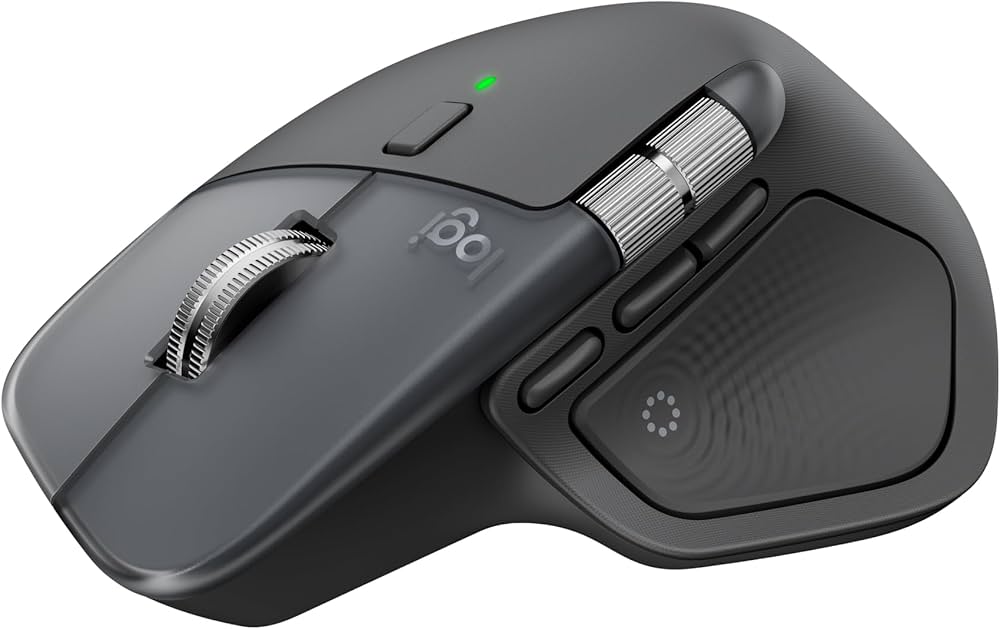
While the MX Master 4 does not signify a revolution, it does refine an already exceptional product. The build quality has improved with a sturdier finish, and the addition of subtle haptic feedback enhances usability, making small adjustments to the user experience.
Pros and Cons
**Pros:**
– Exceptional comfort for medium and large hands
– Quiet, tactile click buttons
– Versatile, high-quality scroll wheels
– More durable finish
– Engaging haptic feedback (although some may find it unnecessary)
– Extensive software capabilities
**Cons:**
– Not designed for left-handed users or those with small hands
– Minimal polling rate
– Lacks onboard memory
– No storage compartment for the USB receiver
– Higher price point ($120)
At its core, the MX Master 4 retains much of what made the 3S popular. The overall shape, battery life, top-tier sensor, and nearly silent clicks remain intact. The mouse is marginally heavier, wider, and taller than its predecessor, with slight adjustments to button sizes, making it slightly more comfortable for users who favored earlier models, particularly palm grippers. However, left-handed users or those with smaller hands may struggle with its design.
Innovative Features
One of the standout features of the MX Master 4 is the introduction of customizable haptic feedback, located within the thumb rest. Using Logitech’s Options+ software, users have control over the intensity of this feedback, which offers a tactile response during various actions. For instance, you’ll receive a gentle buzz when connecting the mouse, switching devices via the “Flow” feature, or when the battery needs charging. Notably, when making precise adjustments in applications like Photoshop, the haptic feedback provides a satisfying confirmation of your actions.
The haptic feedback extends to the Actions Ring, a customizable overlay that offers shortcuts tailored to the application in use. While it may feel gimmicky to some, the feedback can enhance the overall experience by providing reassurance that an action has been completed successfully.
A crucial update is the redesign of the mouse’s outer layer, swapping the rubbery finish of the 3S for a more robust textured plastic. Users had previously flagged issues with wear and peeling in earlier models, so this change could enhance longevity. The mouse maintains its smooth feel without slipping during use. The accuracy of the scroll wheel also remains impressive, allowing users to seamlessly switch between notched and free-spin scrolling.
Minor Tweaks and Improvements
Additional refinements make their way into this model, including a USB-C receiver for Windows users, a more pronounced horizontal scroll wheel, and improved PTFE feet for smoother movements. The gesture button’s redesign also enhances accessibility and ease of use. Logitech claims a more powerful chip inside the MX Master 4 enhances connection quality while maintaining solid battery life, which is rated at approximately 70 days.
However, some drawbacks persist, such as the omission of a USB-C cable, a basic polling rate of 125Hz, and the absence of built-in storage for the USB receiver. Users must also keep the Options+ app running to utilize haptic feedback, which may pose challenges depending on work software restrictions.
While the MX Master 4 may not be imperative for those already satisfied with older models, it is a solid choice for power users seeking an upgrade. Its combination of features and thoughtful design adjustments continue to make it a popular option amongst professionals.