







Reviews
Exploring the Power and Elegance of the HP EliteBook X G2i: A Hands-On Experience

While teams in the USA are busy covering CES, HP has made sure Australia has a preview – they sent me a pre-release version of the business-centric EliteBook X G2i, powered by the newly launched Intel Core Ultra X7 358H CPU.
There’s a slight catch. I can’t share benchmarks yet, but I’m excited to offer you a first look at this impressive laptop.
Among several EliteBook X G2i models announced by HP, this one stands out for its lightweight design, coming in at under 1 kg. While the precise weight is xxxxxx grams on my scale, it still feels remarkably light.
The EliteBook X G2i has a solid build quality. It feels very sturdy, resisting flex within its 14-inch chassis, despite how light it is in hand.
The specifications are robust, featuring the Intel Core Ultra X7 358H, 32GB of RAM, and a 1TB SSD. HP also revealed the EliteBook X G2a with the latest AMD CPUs and the EliteBook X G2q, which will include Qualcomm processors.
Additionally, HP announced a 2-in-1 EliteBook X Flip that shares many features but has a fold-back screen. You can find out more about the EliteBook X G2 Series directly from HP.
Display options are varied. The model I tested showcases a 14-inch 3K OLED display (2880 x 1800), complete with a 120Hz refresh rate, 500 nits brightness, and 100% DCI-P3 color gamut. If you opt for the non-lightweight variation, just 100 grams heavier, you can get the same panel with additional options like a touchscreen or a range of 1920 x 1200 OLED or IPS displays.
One feature I particularly appreciate is the screen’s ability to fold back 180 degrees. This design facilitates easy placement next to a monitor, minimizing desk space. In practice, the OLED is stunningly vibrant and the 3K resolution maximizes usability on the compact 14-inch screen.
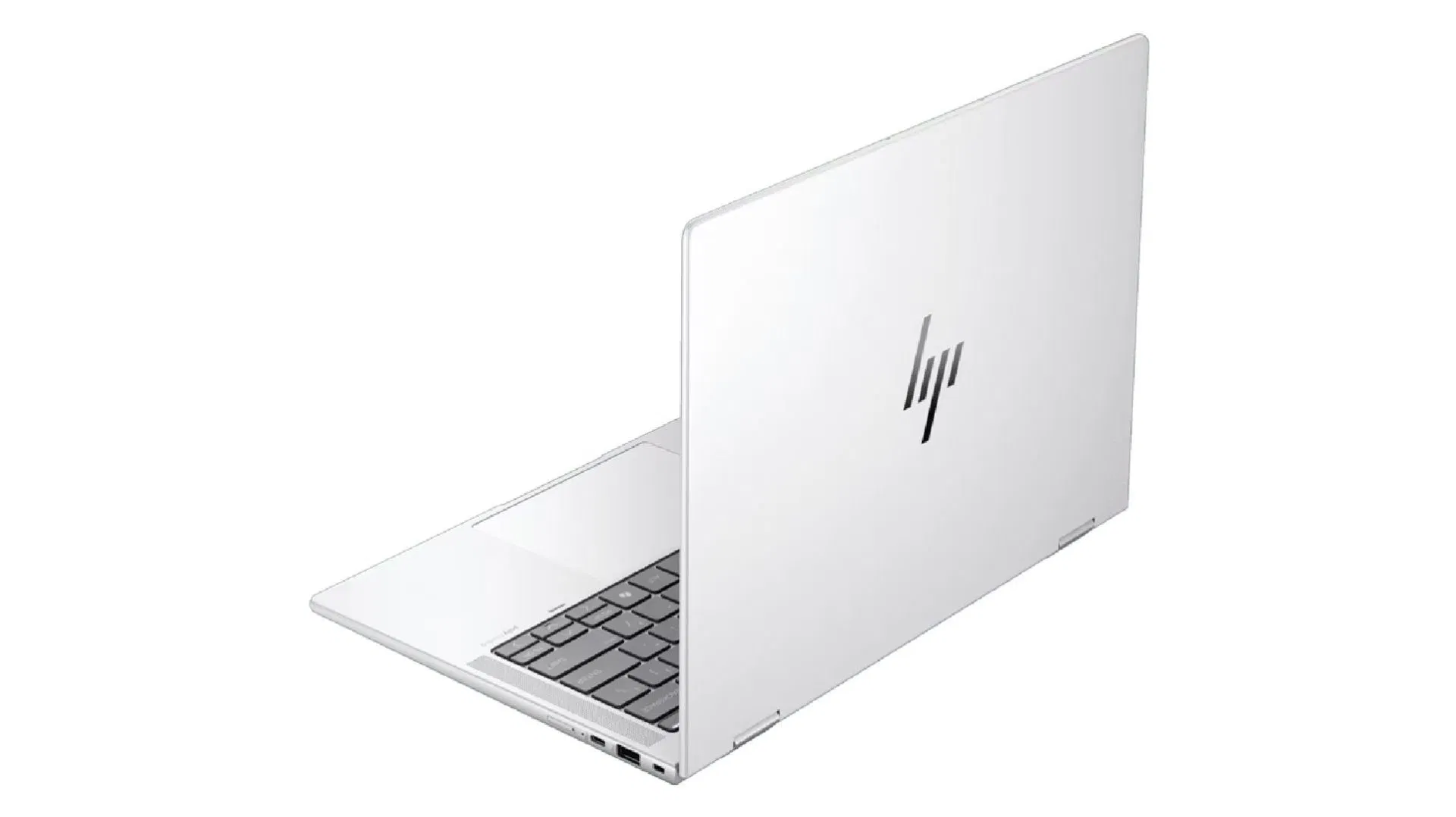
Connectivity options are strong, with dual Thunderbolt 4 ports on the left and a 10Gbps USB-C port (supporting charging and DisplayPort 2.1) on the right. You’ll also find a USB-A port on the right, a Kensington lock slot, HDMI 2.1, and a 3.5mm headset jack on the left.
This is impressive for such a lightweight laptop. My only minor critique is the proximity of the two Thunderbolt 4 ports; a little more space between them would simplify connecting both a dock and a speedy USB drive.
The laptop supports up to four external displays, or three if you’re using USB-C only. It features Intel Wi-Fi 7 BE211 (2×2), Bluetooth 6, and a facial recognition webcam with a privacy cover; a fingerprint sensor is available as an option.
HP EliteBook X G2i: Price & availability
As of now, HP hasn’t released pricing or a specific launch date for the EliteBook X G2i and X Flip G2i, but they should be hitting the market in February 2026.
The larger EliteBook X G2 family, which includes the EliteBook X G2a and G2q, won’t be available until later that year.
HP EliteBook X G2i: Specs
HP EliteBook X G2i specifications (lightweight clamshell variant)
| CPU | Intel Core Ultra X7 358H |
| GPU | Intel Arc B930 |
| Display | 14in 3K OLED (2880 x 1800), 120Hz (VRR), anti-glare, 500 nits, DCI-P3 100% |
| RAM | 32GB LPDDR5x 8533MT/s |
| Storage | 1TB PCIe NVMe M.2 SSD (954GB usable) |
| Connectivity | Wi-Fi 7, Bluetooth 6 |
| Ports | Right: USB-C 10Gbps (USB PD, DP 2.1), USB-A 10Gbps (powered), security lock slot, optional nano-SIM. Left: 2x Thunderbolt 4 (USB PD, DP 2.1), HDMI 2.1, 3.5mm headset jack |
| Dimensions | 312.7 x 219.9 x 9.15mm (front), 14.41mm (rear) |
| Weight | 999g |
| Operating system | Windows 11 Pro |
HP EliteBook X G2i: Design and build
The EliteBook X G2i, despite its lightweight, feels premium. It doesn’t compromise sturdiness; the 14-inch chassis is rigid. The hinge is well-tuned, allowing for one-handed opening while maintaining the desired screen angle.
Flex in the lid or keyboard is minimal, suggesting it can withstand daily, mobile use.
The laptop’s aesthetics appeal to my taste. Its understated branding and professional appearance, complemented by rounded edges, make it pleasant to hold. Available only in “Atmospheric Blue” for the lightweight version, the color complements the design.
The finish does attract fingerprints, but it wipes clean easily, allowing for quick touch-ups before important meetings.
The trackpad is adequately sized, offering good accuracy and a solid haptic click. The keyboard exudes a premium quality feel with minimal bounce. It features keys with reasonable travel depth, providing comfort even during prolonged typing, and I noticed no distracting backlighting bleeding beneath the keys.
HP has made commendable efforts in using sustainable materials; the clamshell design involves up to 90% recycled magnesium, with additional recycled resources distributed throughout components such as the bezel and speaker enclosure.
HP EliteBook X G2i: Performance
While I can’t share precise benchmarks at the moment, I’ve pushed the EliteBook X G2i through a battery of TechRadar tests. There were some inconsistent results and teething issues, which is typical for a pre-production sample with a new CPU. Overall, performance stands as impressive.
Intel’s Core Ultra Series 3 CPUs are notable for their performance, and thanks to a powerful integrated GPU, Intel laptops are becoming more competitive with top offerings from AMD and Qualcomm.
The Core Ultra X7 358H in this model is not significantly quicker than the previous generation in single-core tasks. However, its multicore performance is considerably better. The Intel Arc B930 stands out, surpassing last-gen integrated GPUs like the Intel Arc 140V and Radeon 890M.
Remarkably, it’s strong enough to compete with low-end dedicated GPUs in creator laptops and is capable of casual gaming.
According to Intel’s performance metrics, the Core Ultra X7 358H outperforms the AMD Ryzen AI 9 HX 370 and nearly matches the higher wattage AMD Ryzen AI Max Pro 390. However, the Arc B930 still falls short of the Radeon 8050S.
In typical everyday scenarios, the EliteBook X G2i operates quietly and coolly. Yet, under stress, the noise level does increase, which is expected in a slim laptop. HP has done a commendable job balancing performance without excessive noise.
The lightweight variant has a 56Wh battery, while the standard G2i can be upgraded to a larger 68Wh battery. Though I can’t provide runtime specifics, the battery life is excellent, matching or exceeding other laptops with similar specs using older Intel CPUs, and rivals offerings from AMD and Qualcomm. Although battery life may dip under heavier workloads, the EliteBook X G2i comfortably lasts a full day of work.
AI capability isn’t yet a major priority for most users, but the Ultra X7 358H comes with a 50 TOPS NPU, providing useful enhancements for many tasks and growing utility over time.
The EliteBook X G2i includes a compact 65W USB-C charger that charges rapidly. However, I found it somewhat finicky; it didn’t consistently charge at full speed with some 65W or higher chargers and power banks. Given its USB PD spec, these inconsistencies might be early difficulties ensuring it’s connected to suitable chargers for optimal performance.
HP EliteBook X G2i: Final thoughts
While final evaluations will have to wait until I get my hands on a production model, my experience with the G2i so far suggests it deserves a spot on your shortlist for an upgrade in 2026.